For SaaS companies, deployment speed is no longer just a technical advantage. It is a business growth factor. A SaaS product must continuously improve, fix bugs quickly, release new features safely, support more users and maintain strong uptime across different customer environments. This is why DevOps for SaaS companies has become essential for modern software teams.
A SaaS business depends on reliability, speed, scalability and customer trust. However, if deployments are slow, manual or risky, the product team cannot respond quickly to changing market demands. In addition, when infrastructure is not scalable, application performance declines as the user base grows. Similarly, weak monitoring systems often cause issues to be detected only after customers report them.
A strong DevOps strategy solves these challenges by connecting development, operations, automation, security, testing and cloud infrastructure into one streamlined delivery system. As a result, businesses can release updates faster, improve system stability and maintain a better customer experience. Furthermore, automated workflows reduce human errors, while continuous monitoring helps teams identify and resolve issues proactively. Therefore, DevOps not only improves operational efficiency but also supports long-term SaaS scalability and business growth.
At Techticks, SaaS development is closely connected with cloud hosting, automated CI/CD pipelines, scalable architecture, web application development and DevOps automation. For SaaS founders, CTOs and product teams, the goal is clear: build a system that can ship faster without breaking customer experience.
A properly planned CI/CD pipeline for SaaS helps teams automate code integration, testing, deployment, monitoring and rollback. AWS describes continuous integration as a practice where developers regularly merge code into a central repository and automated builds and tests run after that. AWS also explains continuous delivery as preparing code changes automatically for release after standardized testing.
This article explains the most important DevOps best practices for SaaS companies that want faster releases, stronger performance, better security and long-term scalability.
Why DevOps for SaaS Companies Matters in 2026
The SaaS market moves fast. Customers expect new features, fast onboarding, stable dashboards, secure data handling and uninterrupted service. Traditional development models are too slow for this environment. Manual deployment, disconnected teams and untested releases can create downtime, security gaps and poor user experience.
DevOps benefits for SaaS include faster feature delivery, fewer deployment errors, improved collaboration, better infrastructure visibility and stronger product reliability. Instead of waiting weeks or months for a release, SaaS companies can deploy smaller updates more frequently. This reduces risk because each deployment contains fewer changes and can be tested more easily.
For SaaS businesses, DevOps is not only about tools. It is also about process maturity. A company needs clear development workflows, automated testing, secure cloud architecture, performance monitoring and a release culture that supports continuous improvement.
When done correctly, DevOps helps SaaS companies:
- Reduce manual deployment work
- Improve software quality
- Increase deployment frequency
- Lower downtime risk
- Scale infrastructure based on user demand
- Improve developer productivity
- Strengthen security and compliance
- Improve customer satisfaction
For growing SaaS products, these benefits directly affect retention, revenue and brand trust.
Build a CI/CD Pipeline for SaaS Deployment Automation
A strong CI/CD pipeline for SaaS is the foundation of modern SaaS delivery. CI/CD stands for continuous integration and continuous delivery or deployment. It allows teams to move code from development to production through automated steps instead of manual processes.
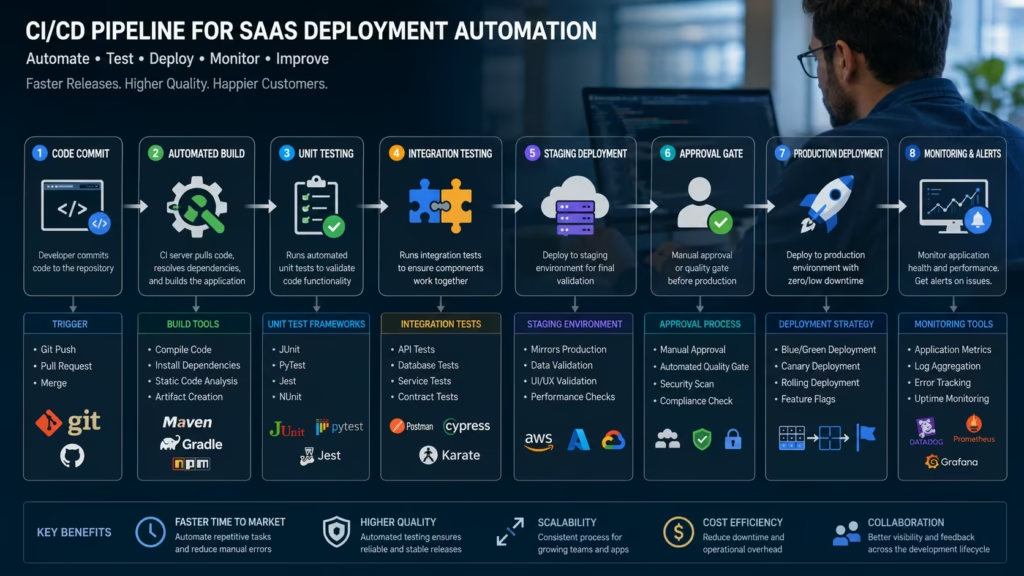
A good pipeline usually includes code commit, automated build, unit testing, integration testing, security checks, staging deployment, approval gates, production release, monitoring and rollback options.
For SaaS companies, continuous integration deployment SaaS workflows are especially important because the product is always live. Unlike traditional software, SaaS users access the platform every day through the cloud. This means deployment mistakes can affect many customers instantly.
Key CI/CD Pipeline Best Practices
A reliable CI/CD setup should include:
- Automated builds
Every code change should trigger an automated build process. This ensures that the application can compile and run before moving forward. - Automated testing
Unit tests, integration tests, API tests, UI tests and regression tests should run before deployment. This helps catch issues early. - Staging environment
Code should be tested in a staging environment that closely matches production. - Manual approval for critical releases
High-risk releases may need approval before production deployment. - Automated rollback
If something fails, the system should quickly return to the previous stable version. - Deployment logs
Every release should be traceable, including who deployed it, what changed and when it went live.
With SaaS deployment automation, teams can release faster while reducing human error. This is especially useful for startups and scaling SaaS platforms where developers need to move quickly without compromising stability.
For companies building or modernizing SaaS platforms, Techticks’ DevOps and Deployment services can support pipeline setup, cloud workflows, monitoring and deployment optimization.
Use Cloud DevOps Architecture for Scalable SaaS Infrastructure
A SaaS application must be designed to grow. If the infrastructure cannot handle increasing users, transactions, storage and API requests, the platform will slow down. That is why cloud DevOps architecture is critical.
Cloud infrastructure allows SaaS companies to scale resources based on demand. Instead of relying on fixed servers, teams can use cloud-native systems that support load balancing, auto-scaling, managed databases, container orchestration and distributed monitoring.
What Scalable SaaS Infrastructure Should Include
A strong scalable SaaS infrastructure usually includes:
- Cloud hosting
- Load balancers
- Containerized services
- Auto-scaling groups
- Managed databases
- Secure storage
- CDN integration
- Centralized logging
- Application monitoring
- Disaster recovery planning
This architecture improves uptime and performance while giving SaaS companies flexibility. If traffic increases during a product launch, marketing campaign, or seasonal spike, the infrastructure can scale automatically.
AWS states that DevOps practices help organizations build and deliver products more rapidly and reliably by simplifying infrastructure management, deployment automation, release processes and monitoring.
For SaaS companies, this matters because customers judge the product by speed and reliability. Even a well-designed SaaS platform can lose users if the infrastructure is slow or unstable.
Adopt Microservices DevOps SaaS Practices Carefully
Many SaaS companies move from monolithic applications to microservices as they grow. Microservices DevOps SaaS architecture can improve flexibility because each service can be developed, deployed and scaled independently.
For example, a SaaS product may have separate services for authentication, billing, notifications, analytics, reporting, user management and API integrations. This makes it easier to update one area without affecting the entire system.
However, microservices also increase complexity. Teams need strong DevOps monitoring tools, API management, container orchestration, service discovery and security controls. Without these, microservices can become difficult to manage.
When Microservices Make Sense for SaaS
Microservices are useful when:
- The SaaS product has multiple complex modules
- Different teams manage different services
- Some features need independent scaling
- The system needs faster release cycles
- The platform handles high traffic or enterprise workloads
For early-stage SaaS products, a modular monolith may be more practical. It keeps the system simple while still allowing future migration to microservices. The best choice depends on product stage, team size, budget, and scalability requirements.
Use DevOps Automation Tools to Reduce Manual Work
Manual processes slow down SaaS teams. They also increase the risk of mistakes. DevOps automation tools help automate repetitive tasks such as testing, deployment, infrastructure provisioning, security scanning, monitoring and backup management.
Common automation areas include:
- Code build automation
- Test automation
- Infrastructure as Code
- Container deployment
- Security scanning
- Database migration
- Monitoring alerts
- Backup scheduling
- Log collection
- Incident response
Infrastructure as Code is especially useful for SaaS companies. It allows teams to define cloud infrastructure using code, making environments consistent and repeatable. This reduces configuration drift and helps teams recreate environments quickly.
With automated software deployment, SaaS teams can move from manual release checklists to predictable pipelines. This improves speed and reduces pressure on developers and operations teams.
Improve SaaS Performance Optimization with Monitoring
Fast deployment is important, but performance must not suffer. SaaS performance optimization should be part of every DevOps strategy. Teams need to monitor application speed, API response time, database performance, server load, error rates and user experience.
A SaaS product may work well during testing but slow down under real customer traffic. Monitoring helps teams detect these issues early.
Important DevOps Monitoring Tools and Metrics
SaaS teams should track:
- Uptime
- Response time
- Error rate
- CPU usage
- Memory usage
- Database query speed
- API latency
- Failed deployments
- User session performance
- Payment or billing failures
DevOps monitoring tools help teams understand system health in real time. They also support faster incident response. Instead of guessing what went wrong, engineers can review logs, metrics, traces and alerts.
For SaaS companies, monitoring is not optional. It protects customer experience and helps maintain service-level expectations.
Apply DevOps Security Practices SaaS Teams Can Trust
Security must be built into the deployment process, not added at the end. DevOps security practices SaaS companies should follow include secure coding, automated vulnerability scanning, secret management, access control, audit logging and compliance monitoring.
SaaS products often handle customer data, payment details, business records, healthcare data, financial data, or internal company workflows. This makes security a core business requirement.
SaaS DevOps Security Best Practices
Important security practices include:
- Use role-based access control
- Store secrets in secure vaults
- Scan dependencies for vulnerabilities
- Run static application security testing
- Use secure API authentication
- Encrypt data in transit and at rest
- Apply least privilege access
- Keep deployment logs
- Use multi-factor authentication
- Monitor suspicious activity
Security automation helps teams detect risks before they reach production. This is often called DevSecOps, where security becomes part of the development and deployment lifecycle.
For SaaS companies serving enterprise clients, strong security can also become a sales advantage.
Choose the Right SaaS Cloud Deployment Strategies
Different SaaS products need different SaaS cloud deployment strategies. The right model depends on user base, budget, compliance needs, traffic patterns and product complexity.
Some SaaS platforms use single-cloud architecture. Others use multi-cloud or hybrid cloud setups. Some deploy with containers, while others use serverless services or virtual machines.
Common SaaS Deployment Strategies
| Deployment Strategy | Best For | Benefits | Challenges |
| Manual Deployment | Very small early projects | Simple to start | Slow, risky, not scalable |
| Basic CI/CD Pipeline | Growing SaaS teams | Faster releases, fewer errors | Needs testing discipline |
| Container-Based Deployment | Scalable SaaS platforms | Consistency, portability, easier scaling | Requires container expertise |
| Microservices Deployment | Complex SaaS products | Independent scaling and releases | More monitoring and orchestration needed |
| Serverless Deployment | Event-based SaaS features | Lower infrastructure management | Vendor dependency and cold start concerns |
| Blue-Green Deployment | High-availability SaaS apps | Safer releases and quick rollback | Higher infrastructure cost |
| Canary Deployment | Products with large user base | Gradual release and risk control | Requires strong monitoring |
For SaaS companies that cannot afford downtime, blue-green or canary deployments are often better options. These methods allow teams to test new releases with limited risk before exposing them to all users.
Connect DevOps with Web App Development
DevOps works best when it is planned during product development, not after launch. A SaaS application should be built with deployment, scalability, security and monitoring in mind from the beginning.
This is why DevOps and web development should work together. Developers should write clean, modular, testable code. DevOps engineers should design environments, pipelines, monitoring and deployment workflows that support the application.
Techticks’ Web App Development services focus on secure, scalable, high-performance applications, which makes them naturally connected with SaaS DevOps strategy.
When web app development and DevOps are aligned, SaaS teams can avoid many future problems, including poor performance, unstable deployments, weak security, and expensive infrastructure rework.
DevOps Best Practices Checklist for SaaS Companies
Here is a practical checklist for SaaS teams that want to improve deployment speed:
- Create a clear branching strategy
- Use automated CI/CD pipelines
- Add automated testing at every stage
- Build staging environments similar to production
- Use Infrastructure as Code
- Add security scanning into the pipeline
- Monitor application and infrastructure performance
- Use rollback and recovery plans
- Track deployment frequency and failure rate
- Improve database migration workflows
- Use cloud-native scaling
- Document release processes
- Train teams on DevOps culture
- Review incidents after failures
- Continuously optimize cost and performance
This checklist helps SaaS companies move from slow, manual releases to a more mature deployment system.
FAQs (Frequently Asked Questions)
What is DevOps for SaaS companies?
DevOps for SaaS companies is a set of practices, tools and workflows that help SaaS teams build, test, deploy, monitor and improve software faster. It connects development, operations, automation, security and cloud infrastructure to support reliable SaaS delivery.
Why is a CI/CD pipeline important for SaaS?
A CI/CD pipeline for SaaS helps automate code integration, testing, staging and deployment. This reduces manual work, improves release speed, lowers deployment errors and helps SaaS teams deliver updates more frequently.
What are the main DevOps benefits for SaaS businesses?
The main DevOps benefits for SaaS include faster deployment, better software quality, improved scalability, lower downtime, stronger security, better monitoring and improved developer productivity.
How does SaaS deployment automation improve release speed?
SaaS deployment automation removes repetitive manual tasks from the release process. Automated builds, tests, approvals, deployments and rollback workflows help teams release faster while reducing human error.
What is scalable SaaS infrastructure?
Scalable SaaS infrastructure is a cloud-based architecture that can grow with user demand. It may include load balancing, auto-scaling, containers, managed databases, monitoring tools and cloud-native deployment workflows.

What are DevOps security practices SaaS companies should follow?
SaaS companies should use secure coding, vulnerability scanning, secret management, role-based access control, encryption, audit logs, dependency scanning and automated security checks inside the CI/CD pipeline.
Which SaaS cloud deployment strategy is best?
The best SaaS cloud deployment strategy depends on product size, traffic, team maturity and uptime requirements. Growing SaaS companies often benefit from automated CI/CD, container deployment, blue-green deployment, or canary releases.
How can Techticks help SaaS companies with DevOps?
Techticks can help SaaS companies design CI/CD pipelines, automate deployments, optimize cloud infrastructure, improve monitoring, strengthen security and build scalable SaaS platforms through DevOps and web app development services.
Conclusion
Faster SaaS Deployment Needs the Right DevOps Strategy
For SaaS companies, speed matters. But speed without stability creates risk. The real goal is not just to deploy faster. The goal is to deploy faster, safer and smarter.
A mature DevOps strategy helps SaaS businesses automate releases, improve collaboration, scale infrastructure, monitor performance and secure customer data. From CI/CD pipeline for SaaS to SaaS deployment automation, from cloud DevOps architecture to DevOps security practices SaaS, every part of the system should support long-term product growth.
SaaS companies that invest in DevOps early can release features faster, respond to customer needs quickly, reduce downtime and build a stronger technical foundation. Whether you are launching a new SaaS product or improving an existing platform, DevOps is one of the most important investments for deployment speed and product reliability.
If you have any questions regarding “DevOps for SaaS companies“, feel free to contact us. For inquiries, call us at: +1 (983) 212-4713.
Disclaimer: The above information is subject to change and represents the views of the author. It is shared for educational purposes only. Readers are advised to use their own judgment and seek specific professional advice before making any decisions. TechTicks is not liable for any actions taken by readers based on the information shared in this article. You may consult with us before using this information for any purpose.